

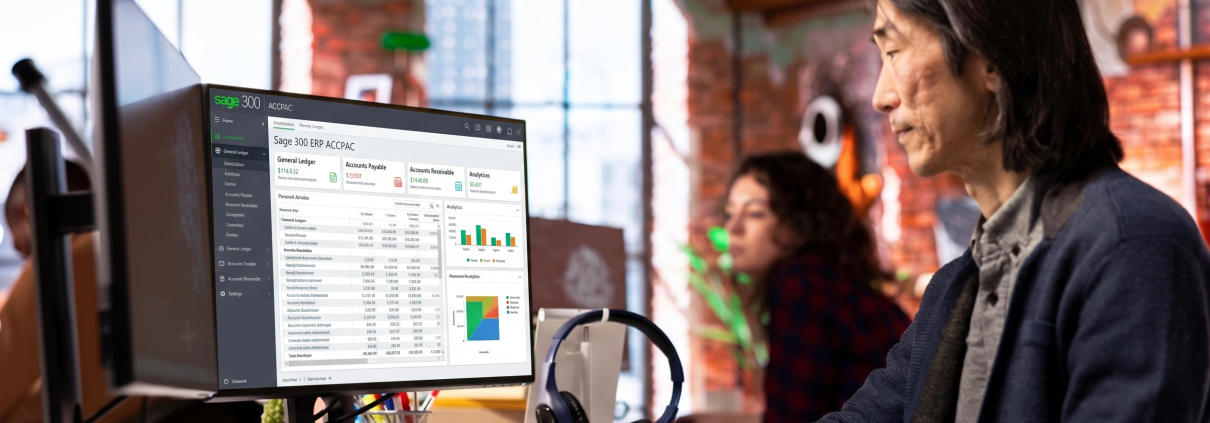
What Is Sage 300? Sage 300 & ACCPAC Explained
Sage 300 is an ERP (Enterprise Resource Planning) and business management software designed primarily for midsize businesses to manage accounting, finance, inventory, operations, and reporting in one integrated system.
If you have encountered the names Sage 300 ERP, Sage ERP Accpac, or simply Accpac, they generally refer to the same product family under different names used over time. Sage officially describes Sage 300 as formerly Sage Accpac.
For companies operating multiple entities, currencies, locations, or international operations, Sage 300 provides capabilities for financial management, inventory, purchasing, sales, operations, reporting, and other business processes within an integrated ERP environment.
Is Sage 300 the Same as ACCPAC?
Yes. ACCPAC is the former name associated with what is now known as Sage 300.
The naming history can be confusing because companies, consultants, and existing users may continue to use terms such as Accpac, Sage Accpac, Sage ERP Accpac, and Sage 300 ERP.
Sage officially states that “Sage Accpac is now Sage 300.”
A simple way to understand the terminology is:
| Term | What it means |
| ACCPAC | Earlier product name |
| Sage Accpac | Product name used after the product became part of Sage |
| Sage ERP Accpac | ERP-era branding for the product |
| Sage 300 ERP | Later product branding |
| Sage 300 | Current primary product name |
| Sage 300cloud | A related Sage 300 offering with cloud-connected/web capabilities |
Therefore, if someone says their company is using Accpac, they may be referring to an existing Sage 300 environment rather than a completely different ERP system.
Why Was It Called ACCPAC?
ACCPAC is the historical name of the software. As the product evolved and became part of the Sage product portfolio, its branding changed.
The product was subsequently marketed as Sage ERP Accpac and then Sage 300 ERP, before the current Sage 300 naming became standard.
This is why older documentation, databases, reports, implementation projects, and users may still refer to the system as ACCPAC.
For example, an organisation may say:
“We have been using Accpac for more than 10 years.”
This does not necessarily mean that the company is using an entirely separate product from Sage 300. The exact version and deployment should be checked to determine the current system configuration.
What Does Sage 300 Do?
Sage 300 brings financial and operational processes together in an integrated ERP environment.
Its capabilities include:
1. Financial Management
Sage 300 provides core financial management functions such as:
- General Ledger (GL)
- Accounts Payable (AP)
- Accounts Receivable (AR)
- Bank Services
- Financial reporting
- Budgeting and analysis
- Financial consolidation capabilities
These functions help businesses maintain a centralised view of financial transactions and reporting.
2. Multicurrency Management
Sage 300 supports businesses that operate with multiple currencies.
This is particularly useful for companies that:
- Buy or sell internationally
- Maintain foreign-currency bank accounts
- Have overseas customers or suppliers
- Operate multiple entities across countries
Multicurrency capabilities can also support processes such as foreign-currency revaluation and the recognition of unrealised gains or losses.
3. Inventory Management
Sage 300 includes inventory management capabilities that help businesses track products, quantities, locations, costing, and inventory transactions.
This can be important for distribution and trading companies where inventory movements need to be connected with purchasing, sales, and financial records.
4. Purchasing and Order Management
Sage 300 can connect purchasing and sales processes with the company’s financial records.
Depending on the modules implemented, businesses can manage processes involving:
- Purchase Orders
- Vendors
- Customer Orders
- Sales transactions
- Receivables
- Payables
- Inventory movements
This reduces the need to maintain separate records across disconnected systems.
5. Reporting and Business Analysis
Reporting is an important part of an ERP system.
Sage 300 provides financial and operational reporting capabilities, while businesses can also extend reporting through compatible tools, add-ons, and custom reporting solutions. Sage currently highlights custom reporting and advanced data insights among the ways businesses can extend Sage 300.
Who Uses Sage 300?
Sage 300 is designed primarily for midsize businesses, particularly organisations that need more than basic accounting software and require integrated financial and operational management. Sage describes Sage 300 as an ERP solution for midsize businesses that supports accounting, inventory, operations, and reporting.
It can be suitable for organisations such as:
- Distribution companies
- Trading companies
- Manufacturing businesses
- Professional services companies
- Multinational organisations
- Companies with multiple legal entities
- Businesses operating with multiple currencies
- Growing companies requiring more sophisticated financial controls
The appropriate modules and configuration depend on the company’s business processes and reporting requirements.
What Are the Main Sage 300 Modules?
A Sage 300 implementation can be configured with different modules depending on the organisation’s requirements.
Common functional areas include:
| Business area | Examples |
| Financials | General Ledger, Accounts Payable, Accounts Receivable |
| Cash management | Bank Services |
| Inventory | Inventory Control |
| Purchasing | Purchase Orders |
| Sales | Order Entry |
| Reporting | Financial Reporter and custom reporting |
| Multi-entity | Intercompany and consolidation capabilities |
| Operations | Project and job-related functions |
| Integration | Connections with other business applications |
Sage’s current product documentation includes modules such as General Ledger, Accounts Payable, Accounts Receivable, Inventory Control, Order Entry, Purchase Orders, Bank Services, Intercompany Transactions, and Financial Reporter.
Sage 300 vs Sage 300cloud
Another common source of confusion is the difference between Sage 300 and Sage 300cloud.
Sage 300 is the core business management and ERP product. Sage 300cloud refers to an offering that provides additional cloud-connected and web-based capabilities.
Sage describes Sage 300cloud as providing access to transactional data through web screens and supporting financial, operational, inventory, sales, and customer-related processes.
The important point is that Sage 300cloud should not automatically be interpreted as a completely different ERP product from Sage 300. Deployment, hosting, web access, and the specific configuration should be evaluated based on the version and architecture being used.
Is Sage 300 an Accounting Software or an ERP?
Sage 300 is more than accounting software. It is an ERP and business management solution.
Accounting is a major component of Sage 300, but the system can connect financial management with other business processes such as:
Purchasing → Inventory → Sales → Receivables → General Ledger → Reporting
This integration is one of the key differences between using a standalone accounting application and implementing an ERP system.
For example, a sales transaction can affect inventory and accounts receivable, while financial information can ultimately flow into the General Ledger and management reporting.
Can Sage 300 Be Customised?
Yes. Sage 300 can be extended through configuration, integrations, add-ons, and custom development, depending on the business requirement and technical environment.
Customisation may be considered when standard Sage 300 functionality does not fully address a company’s local process or industry-specific requirement.
Examples may include:
- Local tax reporting
- Custom financial reports
- Management dashboards
- Integration with CRM or sales systems
- Integration with warehouse or inventory applications
- Payroll integration
- Custom approval workflows
- Industry-specific add-on modules
The objective should not be to customise everything. A good implementation first determines which requirements can be handled through standard Sage 300 functionality and which genuinely require configuration, integration, or development.
What Is Sage 300 Used For in Indonesia?
In Indonesia, Sage 300 can be used as the core ERP system for companies that need structured financial and operational management, particularly organisations with complex accounting requirements, multiple entities, foreign-currency transactions, or integration requirements.
However, Indonesian companies may also require additional configuration, reporting, integrations, or add-on solutions to address local business and regulatory requirements.
This is where local implementation and support experience becomes important.
Sage 300 and ACCPAC: What Should You Call It?
For current website content, Sage 300 should generally be used as the primary product name.
However, ACCPAC remains an important search term because existing users, IT teams, finance professionals, and companies with older implementations may still use the historical terminology.
For example, these searches can refer to the same product family:
- What is Sage 300?
- What is Sage 300 ERP?
- What is Sage Accpac?
- What is Sage ERP Accpac?
- What is ACCPAC software?
- Sage 300 ERP Accpac
- Sage 300 accounting software
- Sage 300 ERP Indonesia
Using both terms in context helps existing ACCPAC users understand that the product they know has evolved into the current Sage 300 platform.
Sage 300 in Indonesia
PT BSC Indonesia provides Sage 300 consulting, implementation, customisation, integration, and support services for companies in Indonesia.
Our experience covers organisations that are implementing Sage 300 for the first time as well as companies that already operate an existing Sage 300/ACCPAC environment and need support, optimisation, integration, reporting, or system improvements.
Depending on the requirement, support can include:
- Sage 300 implementation
- Sage 300 support and maintenance
- System health checks
- Data and issue investigation
- Custom reporting
- System integration
- Add-on development
- Data migration
- Business process improvement
- User and technical support
The right approach depends on your existing Sage 300 version, modules, database, integrations, customisations, and business processes.
If you are evaluating Sage 300 for your organisation and want to understand its capabilities, implementation options, and how BSC Indonesia supports Sage 300 customers, see our Sage 300 ERP ACCPAC solution.
Looking to Buy or Implement Sage 300?
Now that you know what Sage 300 is and how it relates to ACCPAC, the next step is to evaluate whether Sage 300 is the right ERP solution for your business.
BSC Indonesia helps companies in Indonesia assess, implement, customise, integrate, and support Sage 300 ERP ACCPAC. Our services cover the full Sage 300 lifecycle, from implementation and deployment through ongoing support, reporting, integration, and add-on development.
If you are comparing ERP solutions, replacing an existing accounting system, upgrading an ACCPAC environment, or looking for a Sage 300 partner in Indonesia, explore our dedicated Sage 300 ERP ACCPAC solution page.
Frequently Asked Questions About Sage 300
What is Sage 300?
Sage 300 is an ERP and business management software for midsize businesses. It integrates accounting, finance, inventory, operations, and reporting within one business management system.
Is Sage 300 the same as ACCPAC?
Yes. Sage 300 is the current name for the product formerly known as Sage Accpac/ACCPAC. Sage officially describes Sage 300 as “formerly Sage Accpac.”
Is Sage 300 an ERP?
Yes. Sage 300 is an ERP solution that integrates financial and operational business processes.
What is Sage ERP Accpac?
Sage ERP Accpac is an earlier name for the Sage 300 product family. Older implementations, documentation, and users may still use this terminology.
What is ACCPAC software?
ACCPAC is the historical name of the business management and accounting software that is now known as Sage 300.
Is Sage 300 suitable for multiple companies?
Yes. Sage 300 supports multi-entity business environments and is designed to support companies operating across multiple entities and international markets.
Does Sage 300 support multiple currencies?
Yes. Multicurrency is one of Sage 300’s capabilities, making it suitable for businesses that conduct transactions in multiple currencies.
Can Sage 300 integrate with other systems?
Yes. Sage 300 can be extended through integrations, add-ons, and other compatible technologies. The appropriate integration approach depends on the systems involved and the required data flow.
Contact BSC

Interested?
Get in touch with us today and find out how we can help you make significant improvement.
